Sunday, April 30, 2006
Mini Linux Distro on USB ThumbDrive
The Cool Pick Of The Day is SLAX.
SLAX is small (185MB), fast and flexible mini Linux distribution based on Slackware which can fit on and run directly from small (3.14") and normal sized CD-ROM disc, usb drives.
SLAX has some very cool features. First it has modularity- you can customize the system to fit your specific needs and wants by loading additional software in the form of compressed modules. Many modules are available at the website. You can even create your own modules. SLAX is based on the 2.6 Linux Kernel which is unusual for mini distributions which are normally 2.4 based. It also features two very nice file systems: SquashFS and UnionFS which allows a single mount point (single logical filesystem) view of many filesystems and allows read-only filesystems to behave as a writable one by overlaying a writeable file system on top of read-only media (e.g. saving all changes to memory or a USB thumb drive, etc.)
There are 2 ways to create a Slax USB bootable key: The manual hard core way and the MySLAX Creator way. The MySLAX Creator method requires using MS Windows but it is a very easy and comprehensive tool that can do the following:
- Add Slax modules (.mo or .img) to the /modules or /optional directory
- Add general files to the /extra directory
- Remove modules from the original ISO image.
- Add some permanent boot options such as starting SLAX in GUI mode
- Create your own MySlax ISO images.
- Burn created ISO images.
- Prepare a bootable USB stick and copy all the Slax files to it.
MySLAX Creator is a very easy configuration wizard that creates a SLAX image with just a few clicks of the mouse. It is very self explanatory to use and install.

Saturday, April 29, 2006
Sound Editing
With Audacity you can either record analog audio from sources such as a microphone, tapes, or records or import sound files such as WAV, AIFF, AU, Ogg Vorbis, MP2 and MP3. Recording and editing can be done in 16-bit, 24-bit, and 32-bit floating point sampling rates at up to 96 KHz.
Using multi-channel hardware you can record up to 16 channels at once or using a dubbing technique you can dub over existing tracks to create multi-track recordings. A great mixing feature of Audacity is that tracks with different sample rates or formats will automatically be converted in real time. Once loaded you can then edit the sound with operations such as copy, cut, paste, splicing, fading, and mixing and can even undo or redo those operations an unlimited number of times.
Audacity also allows changing a sound recording's pitch without altering the tempo, and vice-versa. Also it is possible to remove unwanted qualities in the recording such as hiss, hum, or static. Frequency alteration with equalization, an FFT Filter, and Bass Boost effect are possible. Volume alteration can be accomplished with compressor, amplify, and normalize effects. Additional sound effects such as wahwah, phaser, echo and reverse are easily done as well. You can save the recording in formats such as Ogg Vorbis, MP3, AIFF, and WAV sound files.
You can also expand Audacity's capabilities with Plug-Ins from various sources such as LADSPA plug-ins, VST plug-ins and even create new effects with the built-in Nyguist programming language.
For those hard core Digital Signal Processing people, visualizing frequencies is available by using the Spectrogram mode and detailed frequency analysis can be accomplished by using the “Plot Spectrum” command.
Installing
The installation of Audacity for MacOS and Windows is simple since you get a .dmg, .sit, or .exe file depending on your OS. For Linux, I chose to download the source. But there are a few additional packages that are needed or recommended. wxGTK is required, libvorbis, libogg, lame, libmad, etc. are needed of you want .mp3, ogg vorbis encoding and decoding support support. See yesterday's (C.P.O.T.D.) for installation instructions for the needed extras.
This is how I installed Audacity on my Red Hat AS 4 box. There may be other packages needed for your installation. Remember there are wonderful resources to get these dependancies, such as up2date and yum. For instance, if you need the gtk development package, it is as easy as doing an up2date gtk-devel or yum -y gtk-devel. From the previous packages installed from past projects covered in C.P.O.T.D., you may not have to install any other packages, if you are lucky. Also, I am using paco for the package tracking (CPOTD post) but you need not utilize it. Just do a make install in place of the corresponding paco... "make install" line.
To utilize more functionality in Audacity, additional Codec libraries must be obtained: flac, libmad, libogg, libvorbis. To simplify the install I downloaded the libraries again since yesterday in the event you haven't gone through yesterday C.P.O.T.D. (go now and read it... its a great post!)
cd /tmp
wget http://superb-east.dl.sourceforge.net/sourceforge/audacity/audacity-src-1.2.4b.tar.gz
wget ftp://ftp.mars.org/pub/mpeg/libmad-0.15.1b.tar.gz
wget http://superb-east.dl.sourceforge.net/sourceforge/flac/flac-1.1.2.tar.gz
wget http://downloads.xiph.org/releases/ogg/libogg-1.1.3.tar.gz
wget http://downloads.xiph.org/releases/vorbis/libvorbis-1.1.2.tar.gz
wget ftp://ftp.mars.org/pub/mpeg/libid3tag-0.15.1b.tar.gz
wget http://easynews.dl.sourceforge.net/sourceforge/wxwindows/wxGTK-2.6.3.tar.gz
tar zxf wxGTK-2.6.3.tar.gz
cd wxGTK-2.6.3
./configure
make
paco -lp wxGTK-2.6.3 "make install"
ldconfig
cd /tmp
for file in audacity-src-1.2.4b.tar.gz flac-1.1.2.tar.gz libmad-0.15.1b.tar.gz libogg-1.1.3.tar.gz libvorbis-1.1.2.tar.gz libid3tag-0.15.1b.tar.gz
do
tar zxf ${file}
done
cd /tmp/audacity-src-1.2.4b/lib-src
mv ../../libid3tag-0.15.1b libid3tag
mv ../../flac-1.1.2 libflac
mv ../../libmad-0.15.1b libmad
mv ../../libvorbis-1.1.2 libvorbis
mv ../../libogg-1.1.3 libogg
cd ..
./configure --with-libmad --with-vorbis --with-libflac --with-libresample --with-portaudio --with-soudtouch --with-libid3tag
make
paco -lp audacity-1.2.4b "make install"
Running Audacity
To run audacity, just type
audacity
Conclusion
Audacity's interface is very clean and elegant, It is very simple to use and is quite intuitive but to get the most out of Audacity, you should look at the documentation, read the manual and go though the tutorials. The documentation is very well written and gives some great tips and techniques to maximize your effectiveness with your audio projects. Also a great resource is The Audacity Wiki which also contains tips, tricks, and documentation that even you can contribute to.
Friday, April 28, 2006
Sound Libraries and Codecs
Each one of these sound packages deserves a C.P.O.T.D. award and I will continue to add informational details on each one. There are a lot of them, so I will do it gradually over time.
In order to maximize your computer's audio capability, you should install some utilities, codecs and libraries, mpg321, libao, ogg vorbis, libmad, LAME, port audio, flac, speex, theora, jackd, sox, ecasound, and mplayer, to name quite a few.
The Libraries
MAD is an open-source GPL (and commercial license is available as well) MPEG audio decoder. It currently supports MPEG-1, 2 and "2.5". All 3 audio layers (I,II,III) are fully implemented. It supports neither MPEG-2 multichannel audio nor does it currently support AAC yet.
A few interesting aspects of libmad is that it supports 24-bit PCM output (e.g. exceptionally high quality audio), it is written using only 32-bit fixed-point (integer) computation (good for non-floating-point architectures!!!) and based on the ISO/IEC standards.
#libmad http://www.underbit.com/products/mad/
cd /tmp
wget ftp://ftp.mars.org/pub/mpeg/libmad-0.15.1b.tar.gz
tar zxf libmad-0.15.1b.tar.gz
cd libmad-0.15.1b
./configure
make
paco -lp libmad-0.15.1b "make install"
Libao is an opensource cross-platform audio library that provides a simple API to allow programs to output audio. Currently it currently supports: Null output (for testing without a sound device), WAV files, AU files; numerous sound architectures such as OSS (Open Sound System), ALSA (Advanced Linux Sound Architecture), polypaudio (next generation GNOME sound server), esd (EsounD or Enlightened Sound Daemon) and NAS (Network Audio Server)
#libao http://www.xiph.org/ao/
cd /tmp
wget http://downloads.xiph.org/releases/ao/libao-0.8.6.tar.gz
tar zxf libao-0.8.6.tar.gz
cd libao-0.8.6
./configure
make
paco -lp libao-0.8.6 "make install"
ldconfig
#libid3tag http://www.underbit.com/products/mad/
cd /tmp
wget ftp://ftp.mars.org/pub/mpeg/libid3tag-0.15.1b.tar.gz
tar -zxf libid3tag-0.15.1b.tar.gz
cd libid3tag-0.15.1b/
./configure
make
paco -lp libid3tag-0.15.1b "make install"
ldconfig
#mpg321 http://mpg321.sourceforge.net/
cd /tmp
wget http://superb-east.dl.sourceforge.net/sourceforge/mpg321/mpg321-0.2.10.tar.gz
tar zxf mpg321-0.2.10.tar.gz
cd mpg321-0.2.10
./configure
make
paco -lp mpg321-0.2.10 "make install"
#libsndfile http://www.mega-nerd.com/libsndfile/
cd /tmp
wget http://www.mega-nerd.com/libsndfile/libsndfile-1.0.16.tar.gz
tar zxf libsndfile-1.0.16.tar.gz
cd libsndfile-1.0.16
./configure
make
paco -lp libsndfile-1.0.16 "make install"
ldconfig
#LAME http://lame.sourceforge.net/
cd /tmp
wget http://internap.dl.sourceforge.net/sourceforge/lame/lame-3.97b2.tar.gz
tar zxf lame-3.97b2.tar.gz
cd lame-3.97
./configure
make
paco -lp lame-3.97 "make install"
ldconfig
#id3lib http://id3lib.sourceforge.net/
cd /tmp
wget http://easynews.dl.sourceforge.net/sourceforge/id3lib/id3lib-3.8.3.tar.gz
tar zxf id3lib-3.8.3.tar.gz
cd id3lib-3.8.3
./configure
make
paco -lp id3lib-3.8.3 "make install"
ldconfig
FLAC (Free Lossless Audio Codec) FLAC is a compression audio standard similar to MP3, but differs from MP3 in that it is compressed without any loss in quality. FLAC works like any other lossless compression method (zip, gz, sit,etc) but since it is designed specifically for audio so the compression ratio is superior to other general purpose lossless compression methods. FLAC is the only free lossless audio compression codec that has hardware support.
The encoding FLAC utilizes is very robust. It has 16-bit CRC's per frame to detect transmission errors while streaming and has an additional MD5 signature of the original audio data stored in the file header as an additional integrity check. This error resistant encoding scheme limits the damage to the frame that the error occurred in which allows for a data stream not to be completely corrupted even by a large block of corruption within the data stream. The resilience is also enhanced by the fact that each frame is not dependant on the preceding or succeeding frames since it contains all it needs for decompression within the frame. This is nice because that allows decoders to pick up when the stream is no longer being corrupted and to not quit processing the remainder of the stream (this would be important if you wished to get as much of the valid stream data as possible even when there was corruption dispersed throughout it.)
The FLAC files are seekable which allows for index positioning which is great for end-user playback as well as for audio editing applications. The format allows for metadata types to be embedded within the FLAC file and currently contains metadata types for tags, cue sheets (e.g. storing a CD table of contents, all track and index points), and seek tables. Additionally, new metadata blocks can be defined and implemented in future versions of FLAC without the worry of breaking older streams or decoders.
FLAC is an open source, "freely" available (modified BSD license) codec library that is supported on many operating systems: *nix (Linux, *BSD, OS X, Solaris, and IRIX), BeOS, MS Windows OS/2, and Amiga.
#flac http://flac.sourceforge.net/
cd /tmp
wget http://superb-east.dl.sourceforge.net/sourceforge/flac/flac-1.1.2.tar.gz
tar zxf flac-1.1.2.tar.gz
cd flac-1.1.2
./configure
make
paco -lp flac-1.1.2 "make install"
ldconfig
#libogg http://www.vorbis.com/
cd /tmp
wget http://downloads.xiph.org/releases/ogg/libogg-1.1.3.tar.gz
tar zxf libogg-1.1.3.tar.gz
cd libogg-1.1.3
./configure
make
paco -lp libogg-1.1.3 "make install"
ldconfig
#libvorbis http://www.vorbis.com/
cd /tmp
wget http://downloads.xiph.org/releases/vorbis/libvorbis-1.1.2.tar.gz
tar zxf libvorbis-1.1.2.tar.gz
cd libvorbis-1.1.2
./configure
make
paco -lp libvorbis-1.1.2 "make install"
ldconfig
Speex is a "gratis" and patent free Open Source Software audio compression format designed specifically for speech (speech coder) whose licensing is the Xiph.org variant of the BSD license.
Speex is based on what is called Code Excited Linear Prediction (CELP) and can compress voice at bit rates ranging from 2 to 44 kbps. Speex's features include: Intensity stereo encoding; Variable bit rate operation (VBR); Voice Activity Detection (VAD); Discontinuous Transmission (DTX); 8 kHz, 16 kHz, and 32 kHz compression in the same bit stream; and Packet loss concealment.
#speex http://www.speex.org/
cd /tmp
wget http://downloads.xiph.org/releases/speex/speex-1.0.5.tar.gz
tar zxf speex-1.0.5.tar.gz
cd speex-1.0.5
./configure
make
paco -lp speex-1.0.5 "make install"
ldconfig
#vorbis-tools http://www.vorbis.com/
cd /tmp
wget http://downloads.xiph.org/releases/vorbis/vorbis-tools-1.1.1.tar.gz
tar zxf vorbis-tools-1.1.1.tar.gz
cd vorbis-tools-1.1.1
./configure
make
paco -lp vorbis-tools-1.1.1 "make install"
ldconfig
#libtheora http://www.theora.org/
cd /tmp
wget http://downloads.xiph.org/releases/theora/libtheora-1.0alpha5.tar.gz
tar zxf libtheora-1.0alpha5.tar.gz
cd libtheora-1.0alpha5
./configure
make
paco -lp libtheora-1.0alpha5 "make install"
ldconfig
#portaudio http://www.portaudio.com/
wget http://www.portaudio.com/archives/portaudio_v18_1.zip
unzip portaudio_v18_1.zip
cd portaudio_v18_1
make -f Makefile.linux
paco -lp portaudio_v18_1 "make -f Makefile.linux libinstall; cp pa_common/portaudio.h /usr/local/include"
ldconfig
#jackd http://jackit.sourceforge.net/
wget http://superb-west.dl.sourceforge.net/sourceforge/jackit/jack-audio-connection-kit-0.100.0.tar.gz
tar zxf jack-audio-connection-kit-0.100.0.tar.gz
cd jack-audio-connection-kit-0.100.0
./configure
make
paco -lp jack-audio-connection-kit-0.100.0 "make install"
ldconfig
#sox http://sox.sourceforge.net/
wget http://superb-east.dl.sourceforge.net/sourceforge/sox/sox-12.17.7.tar.gz
tar zxf sox-12.17.7.tar.gz
cd sox-12.17.7
./configure
make
paco -lp sox-12.17.7 "make install"
#ecasound http://eca.cx/ecasound/
cd /tmp
wget http://ecasound.seul.org/download/ecasound-2.4.3.tar.gz
tar zxf ecasound-2.4.3.tar.gz
cd ecasound-2.4.3
./configure
make
paco -lp ecasound-2.4.3 "make install"
ldconfig
#mplayer http://www.mplayerhq.hu/design7/news.html
mkdir /tmp/mplayer
cd /tmp/mplayer
wget http://www1.mplayerhq.hu/MPlayer/releases/MPlayer-1.0pre7try2.tar.bz2
wget ftp://ftp1.mplayerhq.hu/MPlayer/releases/codecs/essential-20050412.tar.bz2
tar jxf MPlayer-1.0pre7try2.tar.bz2
cd MPlayer-1.0pre7try2
./configure
make
paco -lp MPlayer-1.0pre7try2 "make install"
mkdir /usr/local/lib/codecs
cd /usr/local/lib/codecs/
tar jxf /tmp/mplayer/essential-20050412.tar.bz2
Thursday, April 27, 2006
A flashback... a moment of nostagia... Bolo!
The sense of nostalgia over took me this morning. For some reason I had a moment of reminicing and thought of a game I used to spend hours playing against a coworker. The Cool Pick Of The Day is about that game- Bolo.
What is Bolo?
The Bolo version which became so popular (the Mac version) was created by Stuart Cheshire. It is a real-time multi-player tank game for up to 16 players in which you get unlimited lives. The official site is http://www.lgm.com/bolo/ The original MacOS version is still available but for MacOS X you will need to use either xbolo or nubolo. The Mac versions don't communicate with the Windows and Linux versions. The Windows and Linux version communicate with each other.
The objectives of Bolo are simple: destroy the other players (or team up with them and blow up the other-other players); capture and create pillboxes (kind of like machine gun nests); take control of all the bases (all your base are belong to us); and have fun!
In Bolo your tank holds 4 types of supplies: bullets, armor, mines, and trees. When you start out (each time you enter the game field) you start out with bullets equal to 2x the amount of unclaimed bases. If there are none, you start with no bullets... this is important to remember so you want to capture as many bases as possible. You can replenish your supplies at your bases. When you run out of bullets, you can't shoot until you dock at a friendly base. If you have no bases and no bullets you better have a friend! You also have a little green man (LGM) that can jump out of your tank and build pillboxes, roads, bridges, walls, boats, etc. but you need trees to do this. So you send your LGM out to harvest the trees and bring them to the tank. He can also lay covert mines that can't be seen by your opponents (unlike the ones you can drop out the back of your tank). The covert mines explode when something runs over them or when there is an explosion next to them... until then, they lay silently awaiting a victim.
Pillboxes are powerful weapons that you want to capture and rebuild as your own to protect your bases. Laying strategically placed invisible mines and well positioning pillboxes are a total nightmare for the opposing players. Another thing the LGM can do for you is repair your pillboxes as long as you have trees in supply.
What also makes Bolo so fun is the ability to have different playing fields or as they are called maps. There are different terrains and obstacles each with a different aspect to them. There are:
trees, grass, rocks, rubble, craters, shallow water, deep water, swamps, walls and roads.
Strategy Guide
http://www.lgm.com/bolo/guides/pbg/
Obtaining Bolo
Bolo for MacOS (7??)
http://www.lgm.com/bolo/archive/
For Windows and Lindows
http://www.winbolo.us/downloads.asp
http://www.winbolo.com/
http://www.winbolo.net/
For the Macintosh (MacOSX)
http://www.nubolo.net/
http://www.xbolo.net/
Installing Bolo
Your installation for Linux may be slightly different since your installation may not have certain things installed. The basic requirements for linbolo are:
1) x86 Linux 2.2+
2) 8Mb of RAM
3) Glib 2.2+
4) SDL 1.2
I have Redhat Enterprise AS 4 so I needed to do the following:
I downloaded LinBolo 1.13 from http://www.winbolo.us/downloads.asp
wget http://www.libsdl.org/projects/SDL_mixer/release/SDL_mixer-1.2.6-1.i386.rpm
wget http://www.libsdl.org/projects/SDL_ttf/release/SDL_ttf-2.0.7-1.i386.rpm
wget http://www.libsdl.org/release/SDL-1.2.9-1.i386.rpm
ln -s /usr/lib/libSDL_ttf-2.0.so.0 /usr/lib/libSDL_ttf-1.2.so.0
up2date fonts-xorg-truetype
cp /usr/X11R6/lib/X11/fonts/TTF/luxirb.ttf cour.ttf
The game requires /usr/lib/libSDL_ttf-1.2.so.0 and since that is very hard to find, SDL_ttf-2.0.7-1 is fine as long as you make the proper soft link. The game also needs a courier TrueType font. I did not want to take if off my Mac or my windows box since I wanted a total Linux solution. So I got the xorg TrueType font package and just renamed the luxirb.ttf font to cour.ttf. Using one of the TTF fonts from OpenOffice also worked but the fonts where not as clear for this specific instance.
If you wish to set up your own bolo server, you can do so by downloading the(Dedicated Server, LinBoloDS 1.14 available at http://www.winbolo.us/downloads.asp
Using the Dedicated Server you can even have LAN parties!!
The trick to Bolo is to balance repair and capture duties with Hunting/Killing duties. You must learn to multi-task while still keeping a good strategic plan in your head. Keep your armor topped up, lay mines, capture bases, capture and rebuild pillboxes, and blow the sense out of your enemy Without a doubt this game is SUPER ADDICTIVE! It is very fun to play. With Skype or Voice IM clients, your allies and you can talk to one another and coordinate attacks. It is a great multi-player Internet game. Simple, fun, addictive. The perfect blend of all the components characteristic of a successful video game!
Wednesday, April 26, 2006
Free Book Sources
The wonderful thing about the Internet is the sharing of information. The following sites have 1000's of free books and articles. The Cool Pick of the Day is actually all the below links. I thought that since they all are offering a great service, they should all be considered the C.P.O.T.D.
Free Technical Book Links - A growing list of free book references here! Great source!
http://www.techtoolblog.com/archives/195-free-online-programming-books
The Internet Archive - A vast source of Texts, Education Material, Moving Images (movies, films, etc), Audio, Software, Web archives... truly amazing!!!
http://www.archive.org/
Books published by O'Reilly That have been either "Opened" or started as Open Books from the start.
http://www.oreilly.com/openbook/
"The Open Book Project is aimed at the educational community and seeks to encourage and coordinate collaboration among students and teachers for the development of high quality, freely distributable textbooks and educational materials on a wide range of topics." (from their site)
http://www.ibiblio.org/obp/
"This site lists free online computer science and engineering books (+lecture notes), all of which are freely and legally available over the Internet." (from their site)
http://www.freetechbooks.com/
Many Free Books Sources. There are some purchasable books here to but you can just ignore those if you want.
http://homepage.mac.com/kaotech/Free_Books.html
Many Free Books Sources. There are some purchasable books here to but you can just ignore those if you want.
http://www.nap.edu/
There are 18,000 free books in the On-line Book Catalog.
http://www.gutenberg.org/
A Listing over 25,000 free books
http://onlinebooks.library.upenn.edu/
Free Medical Books
http://www.freebooks4doctors.com/fb/english2.htm
Many books that are in the public domain
http://www.e-book.com.au/freebooks.htm
Children's materials in their original languages
http://www.childrenslibrary.org/
A Directory of Free On-line Books
http://www.free-book.co.uk/
Wikipedia Projects
http://wikipedia.org/
http://en.wikibooks.org/wiki/Wikibooks_portal
A Free Dictionary
http://en.wiktionary.org/wiki/Main_Page
An open, free directory of species. It covers Animalia, Plantae, Fungi, Bacteria, Archaea, Protista and any other forms of life.
http://species.wikipedia.org/wiki/Main_Page
Collection of Quotes
http://www.wikiquote.org/
Tuesday, April 25, 2006
Technology and Mobility
We can traverse land faster than any other species using motorized vehicles. We can move through water faster than any other species using boats and submarines. We can fly faster and higher than any other species using airplanes. We can dig and move earth around like no other species on Earth using drilling machines, shovels, and trucks. The key here is that we make machines- fantastic machines. Many times we take the ideas that are within nature itself- sonar, airplanes, etc. Other times we create totally different approaches such as rockets and motors. There are even times where there is no better machine for the job, so we use natures best such as using leeches and maggots.
Yes its true, we still use leeches and maggots in medical science. Why do we use leeches and maggots? You might say what most people say... ewww! Well, for one, we use them because they are designed to do certain thing. Leeches suck blood and maggots eat decayed flesh. When reattaching severed limbs and fingers, the leeches are used to painlessly remove blood that swells the damaged area thereby preventing the swelling from doing additional damage or to prevent blood clotting of tiny blood vessels that may cause blood flow to be blocked (Leech Therapy). In Maggot Therapy (MDT) certain types of maggots are used to eat away decayed flesh (because they DON'T eat living flesh) to reduce the chances of gangrene. We even are trying to make microscopic machines that rival viruses and bacteria called nanites, nanobites, or nanomachines. Anyway, back to machines and mobility.
An interesting quality of mankind is its desire overcome obstacles. Modern thought is to not look at a physical or mental disability as a total loss but to instead look at it as a challenge or an obstacle to overcome. Many contributions to science have been made to overcome the disabilities of individuals. A Chinese scientist has outfitted a child with sonar goggles to great success- the child can hit a ball thrown his direction with a baseball bat. Artificial limbs, hearts, and optical technologies have been created to overcome problems... even enhance those without disabilities (such as night vision).
There are quite a few notable physically disabled people that have made great contributions to mankind- Dr. Steven Hawking being one that immediately pops to mind. His disability being caused by amyotrophic lateral sclerosis but does that stop him from being one of the world's leading theoretical physicists? No. For sure, one of the most notable things, other than Dr. Hawking's brilliance, that comes to light when you see the good Dr, is his enabling technology. His computer, his blink switch, his voice synthesizer, and his wheel chair are so essential to his mobility and communication. When seeing him with his technology, I don't even see his disability, rather I am enthralled by his intellect. I can almost believe that his will and intellect actually power all those devices.
Which brings me to the Cool Pick Of The Day- Enabling Technology such as the Wheel Chair but not just any wheel chair- super wheel chairs. I have seen 2 that absolutely are astounding: IBOT by Independence Technology which was invented by Dean Kamen (also inventor of the Segway) and the TankChair created by a small Arizona company called TankChair.com.
The iBOT® Mobility System uses a patented technology called iBALANCE® which is a combination of sensors, software components, and multiple computers that work in conjunction with gyroscopes to continually help maintain the chair's balance. The chair's on-board, triple redundant backup systems and computers, are custom-programmed to the chair's user’s center of gravity, to ensure that it responds properly, even with subtle changes in motion, and even constantly realigns and adjusts its wheel position and seat orientation to keep the user upright and stable all the time. The fascinating aspect about this wheel chair is that it not only climb curbs, stairs, and inclines with little problem, it can even stand up and balance on 2 of the 4 wheels to raise the user up- similar to standing up from a seated position.
The TankChair is not about subtly or gyroscopes or triple redundant computers... its about mobility and power- TANK POWER! While it is true there are many types of outdoor capable wheel chairs (the iBOT® also can go outdoors), the TankChair powers through dirt, sand, snow, and grass with ease. Its tank treads make light work of reasonable terrain and is fully controllable by a hand joystick, not unlike those found on other power wheel chairs. The inventor created this chair for his wife who was injured in an accident and this has given her the freedom she wants to participate in the everyday outdoor activities that she would have difficulty with using traditional motorized wheel chairs.
Technology Rules!
Monday, April 24, 2006
Vector Drawing
I truly love cross-platform developed items. The benefit of cross-platform development is that the end result is usually a very stable and very versatile product. This is simply because the more diverse the install base the stricter the development process has to be. If it is not, then the product will not be a successful cross-platform product.
Whether it be a hardware cross-platform Operating Systems/Kernels such as Linux which runs on a huge amount of processors or hardware devices such as USB devices such as the Logitech QuickCam or in the software realm, offerings such as GNU utilites or various applications such as OpenOffice, Audacity, or The Cool Pick Of The Day – Inkscape http://www.inkscape.org/
Inkscape is a cross-platform Open Source vector graphics editor, with capabilities similar to Adobe Illustrator ™, Macro media’s Freehand ™ and Corel’s CorelDraw ™ supporting the Scalable Vector Graphics (SVG) file format. It runs on MacOS X, Linux, and Windows. The main goal of Inkscape is to create a powerful and convenient drawing tool fully compliant with XML, SVG, and CSS standards.
The supported SVG features include shapes, paths, text, markers, clones, alpha blending, transforms, gradients, patterns, and grouping. It also supports Creative Commons meta-data, node editing, layers, complex path operations, bitmap tracing, text-on-path, flowed text, direct XML editing, and more. It can import JPEG, PNG, TIFF format files others and exports PNG as well as multiple vector-based formats. Inkscape does not yet support SVG filters, animation, and SVG fonts.
Inkscape is a vector drawing program which is unlike raster drawing programs like The Gimp, Micro Frontier’s ColorIt™, or MSPaint™. Raster drawing applications are pixel level editors that create pictures by placing pixel on a canvas. Vector drawing applications create objects that are mathematically defined to allow them to be scaled and manipulated without degrading their quality. It also allows the ability to apply mathematical operations such as Boolean operations such as
The Inkscape interface is very simple and clean and also has a very intuitive keyboard shortcut interface. It includes many tools for selecting, drawing, and modifying objects. The tools are: the selection tool; the path edit tool; the zoom tool; the square and rectangle tool; ellipse, circle, arc tool; the polygon and star tool; the spiral tool; the bezier tool; the calligraphy tool, the text tool; the connectors tool; the gradient tool; and the eyedropper tool. It also has the ability to do layers, grouping objects, and transformation of objects such as flipping, scaling, skewing and free rotating.
It also has interesting additions such as grid and guideline snapping that uses a tunable "gravity" style rather than the typical absolute snapping. Fine tuning objects can be done such as nudging a pixel at a time. There is also an XML editor built in to allow direct access to the drawing's underlying DOM model.
Here is a nice tutorial on Inkscape http://tavmjong.free.fr/INKSCAPE/MANUAL/html/index.php
Installation
First you need inkscape. There are quite a few options for Linux: tar.gz source code, rpm staitic binaries, rpm sources, or an autopackage package. Since there are quite a few components that are necessary, the static binaries RPM package seemed the quickest to install. Installation was simple for my i686 architecture. To get all the download options and a browser download page go to http://www.inkscape.org/download.php.
Since I have Red Hat AS 4, I did a
cd /tmp
wget http://internap.dl.sourceforge.net/sourceforge/inkscape/inkscape-0.43-0.static.i686.rpm
rpm -i inkscape-0.43-0.static.i686.rpm
To run inkscape, just type
inkscape
Conclusion
Inkscape is a very nice vector drawing package for artists and non-artists. Its elegant interface allows fast creations with excellent quality output and its XML editor allows some very hardcore tweaking. It also is nice to have an "image" creation application that uses XML output (SVG) files. Each release of the software continues to add significant functionality and the developers have an aggressive stance toward elliminating bugs. The project has multiple ways to get help such as they mailing list, a Wiki, and even Jabber and IRC messaging for developers. The inkscape community seems to really be a close knit group of creative and helpful people who are dedicated to producing and supporting a great product.
Package Management
In order to simplify updates to applications and libraries many package managers have been created. To try and best solve the problem of keeping a system’s programs up to date and secure many approaches have been implemented. Wikipedia defines a package management system as “a collection of tools to automate the process of installing, upgrading, configuring, and removing software package from a computer.”
There are many features that are nice additions to the general functions (install, listing, upgrade, remove) of a package manager such as checksums to detect corruption, dependency tracking, and component tracking.
A brief list of a few common package managers:
1) OpenPkg http://www.openpkg.org/
2) Debian Potato dpkg (.deb)
3) Red Hat Package Manager
4) Gentoo’s
5) FreeBSD Ports
6) MacOS Installer
7) Fink (used in MacOS) http://fink.sourceforge.net/
8) SlackWares tgz package system
9) HP-UX’s Software Distributor
10) TRU-64’s setld
11) Solaris’ SysV format (called pkgmgr)
12) Autopackage http://autopackage.org/
1) You need to create the package- this is time consuming. There are quite a few “services” that provide many packages- rpmfind, up2date, yum, yast, apt-get, etc. This can really be a time saver if you don’t want to create your own… but heed problem 2
2) Dependency Hell. This is when there is either a conflict with existing libraries/packages or you don’t have the dependencies needed for the specific package install. The combination of conflict and lack of specific dependencies can be extremely frustrating.
3) Distribution dependant
The Hard Core Approach
This is the ./configure/make/make install route. It is not as bad as it sounds and it is surely simpler that creating a package from scratch. Usually source packages, sometimes referred to as tar balls (.tar.gz files), are very easy to install especially if you have a modern distribution of Linux. My philosophy is simple- if a source package doesn’t ./configure, make, make install easily (you do need to have the prerequisites of course) then I deem the package total crap and find another solution. If there are no other solutions, I grind away at the problems using my experience, deja.com, forums, and search engines.
But upon completion of the ./configure/make/make install I am still left with having NO idea what I installed and where it all went. Sure ./configure has the –prefix commands etc, but what about log files, and /etc files or any other thing that was installed. By default most source tar balls install in /usr/local but not always. To be accurate, the package could install stuff ALL OVER the place. You have no idea what kind of nut case created this package. So how do you track the install and remove packages when needed?
This question brings me to the Pick Of The Day Paco – PACkage Organizer. It is a GPL Open Source package organizer for source code for Unix/Linux systems. It can be found here http://paco.sourceforge.net/
When installing a package from sources, Paco wraps the installation command (make install, ./install.sh, or whatever), and generates a log containing the list of all installed files. How does it perform this magic? It is accomplished using the “LD_PRELOAD” method which preloads a shared library before installation using the environment variable LD_PRELOAD. During installation, this library catches the system calls that cause filesystem alterations (such as open(), link(), rename), and logs the created files. This method is very simple to use and it does not require a "pre-install" phase because it monitors processes while they run.
Since the preloaded library is used during the specific installation process, the paco logs are not contaminated with any file created by other processes making filesystem alteration calls- You can even use paco to track parallel installations.
Paco has many usage options for looking at package files, file counts, sorting, missing files, etc. The one thing it lacks, and I don’t know why such a simple feature is not included (I will contact the maintainer), is a checksum or MD5 type check. This could easily be added and used to check the integrity of packages tracked by Paco.
An added bonus is gpaco, a GTK+ based GUI for Paco. Unfortunately, it requires GTK+-2.6, which I do not have on Red Hat AS 4.
Drawbacks to Paco:
1) Can’t be used on systems where the binaries are statically linked such as FreeBSD or OpenBSD.
2) Graphical installers may not be able to be captured. If there is a CLI installation method, use that. (I need to check on this… Such as using the Oracle Graphical Java installer).
3) Lacks a checksum or MD5 type check.
Installation of Paco
Since I did not have GTK+2.6 or later I needed to do the following for installation:
wget http://superb-east.dl.sourceforge.net/sourceforge/paco/paco-1.10.7.tar.gz
tar zxf paco-1.10.7.tar.gz
cd paco-1.10.7
./configure --disable-gpaco
make
make install
Using Paco
I used paco to install splunk-server. Splunk comes with its own installer and I figured I would see if paco could handle it.
To install splunk-server you need to type
./splunk-Server-1.2.4-linux-installer.bin
then answer a bunch of questions. So I used this to install splunk-server with paco
Paco worked like a champ!!
'make install'
paco -lp jackBnimble-1.0.0 "make install"
paco will create a log file named jackBnimble-1.0.0 in the log directory, with the list of all installed files.
paco -lD “make install”
To update a Paco log with a file that was not added during a previous installation yu can use the ‘-+’ option:
paco -rx -e /etc:/root --batch JackBNimble
If you wish to post process a package installation of jackNjill that is installed in /usr/local/jackNjill but paco was not initially used to log the install, you can use the following command to do just that:
find /usr/local/jackNjill-1.2.3 | paco -lp jackNjill-1.2.3
Conclusion
There actually is room for both types of package managers: the pre-built kind (like RPM) and source code logging types (like Paco). I think package managers such as RPM are GREAT for core package handling and kernel updating and the like. It is nice to know there are MANY people and companies out there updating the thousands of packages my system uses. This allows for stable and secure packages with minimal hassle when the big time crunch happens when there is a security alert. In addition to the RPM facility, updater technology such as YAST, yum, and up2date are truly fantastic. The package managers that are like Paco are great for those applications that are source code only distributions or for developers who wish to try the latest software and want to be able to track, update, and remove those added packages, but their complex environment would be problematic with dependancy issues.
Saturday, April 22, 2006
Documentation Tutorials and Presentations
I am a real documentation hound! I love to document. I'm far from being great at it but I do like to do it. I find documentation such an essential part of maintenance and acceptance. If you expect ANYTHING to be purchased, maintained, and accepted, it must contain documentation. When I design an application or a script, I am not satisfied until it is bulletproof... this is a great thing... the problem with having “bulletproof” software is that it breaks so infrequently and when it does... how the internal workings function are a real mystery. I have looked at software of mine from 10 years ago, and other than being shocked at how far I have come since I first wrote it, I am pleased to see the flow, the routines, and even the Bugs have been documented. That fact alone has saved me hours maybe even days of work tracking down any problems.
They say a picture is worth a thousand words. I think that is true. I am a real fan of diagrams. I love Visio. I wish Linux had something as nice... I know there is Dia and Kivio but they are not even close to the functionality of Visio. Anyway, I digress... If a picture is worth 1000 words then an interactive tutorial must be worth at least 10000 words or 10 diagrams. What format should be used for the interactive tutorial? You want to make it a format that is at the very least crossplatform.
Formats like mpeg, etc. are great movie formats and can really be key in showing a process that is not interactive. Sure it can be used as a HowTo, you see it all the time on DIY shows... but it is not Interactive. It is also not very suited to capturing the computer tutorials. So what is? Flash? ShockWave? Yeah! Thats the ticket! There are quite a few Flash/Shockwave tutorial creation tools available, but one in particular caught my eye... and it FREE! For Personal AND Business usage! AND available for Windows and Linux!
The Cool Pick Of The Day is Wink. You can find it at http://www.debugmode.com/wink/
Wink is a Demonstration creation tool that is oriented towards the creation of Application HowTo Tutorials and Presentations. You can capture screen shots and cursor movement and even add sound. In addition, you can add instructional text inside explanation boxes (called callouts), titles and add navigational widgets such as Forward, Backward and GoTo buttons.
Also Wink allows very nice control of cursor motion. Since Wink separates the cursor events in a separate editor stream, you can hide the cursor, change the cursor, or reposition the cursor in each frame of your tutorial.
Using templates in your design process can give all your tutorials a consistent look and feel. By adding custom background pictures, logos, text, etc to the template, those features will automatically be added to every frame of your presentation which makes for a professional touch.
You can add audio as well (Windows version only). This feature is great. It adds a professional quality to the presentations and can assist the user experience since a user can be listening to the process and following its instructions without having to take up valuable screen real estate.
By utilizing all these features, you can guide a tutorial viewer through complex processes and still give them full control over their learning experience.
One of Wink's strengths is its flexibility. Wink supports a variety of picture formats for input: bmp, jpg, gif, tiff, and png as well as quite a few output options for the presentation such as Macromedia Flash, Standalone EXE, PDF, PostScript, HTML or any of the picture input formats. The Flash and html output options are nice when you want to add your presentations to a web site. The standalone .exe format is nice for distributing to Windows users. While not a direct feature of Wink, with a little of your own effort, you could even create an auto play CD and have a "bootable presentation."
Another feature that can be useful is Frame Scaling. This feature allows you to scale your presentation screen size. I would hardly imagine anyone using it to scale a presentation BIGGER but scaling smaller for quick and small presentations on the web maybe quite useful for giving a "Flavor of" presentation- Not alot of details but giving the general idea of what to do. Because screen captures are bit mapped scaling is not a great thing to do. If it is a concern that your presentation is not going to comfortably fit on a screen for a step-by-step presentation, then do the presentation in native resolution (say 800x600) then there would be no need for scaling down to 800x600 from 1024x768 (or higher).
There is plenty of language support too- English, French, German, Italian, Danish, Spanish, Serbian, Japanese, Brazilian Portuguese and Simplified/Traditional Chinese. This is such a nice feature if you are making multilingual presentations.
Though not a feature of the software, Wink has a good supportive user forum community accessible from the website http://www.debugmode.com/userforums/. This is a nice touch that the developers of Wink have supplied. There are many people on the forum who have created great tutorials and give some great support, as well as, sharing many tips and hints for making better tutorials.
I do highly recommend reading the 36 page manual/tutorial they give you. It explains everything well and has a nice walk-through tutorial. It does an excellent job at explaining the components of Wink and how to use them effectively.
Using Wink
Starting your Demonstration is quite easy. Just choose File>New to create a new project and the New Project Wizard presents you with a few options. At this stage you can: choose to capture Audio; set the screen size to capture, screen region or window; the frame rate; and Input Driven events (mouse and key) to capture. The next step in the Wizard just gives you the Hot Key choices and an option to Cancel or Minimize Wink to the SystemTray.
The hot key choices are:
1) Take a screen snapshot <Pause>
2) To start/stop timed captures <Shift-Pause>
3) To start/stop input-driven captures <Alt-Pause>
After you Minimize to the System Tray, you can press Shift-Pause and go through the motions of the Task you wish to capture. Then press Shift-Pause again. Then double click the Wink Icon in the System Tray and click Finish in the Wink box. Now you are ready for Creation and Editing.
You can take multiple captures and copy and paste them into a project. Then you can add CallOuts and buttons to each frame by using the Properties for Frame box (the Properties Bar).
Because there is no Undo feature, it would be prudent to Save As using the presentation name with a version number or some designation before making major changes or after each stage of presentation completion. Save often and save many staging copies. Then when you are done, delete all the other unneeded presentations.
Conclusion
At the moment, I can only see 2 small draw backs with the software:
1) I could not get a Windows project to load into the Linux version of the software. I think that is because there is a version difference- 1.5 for Linux and 2.0 for Windows. I was able to get a Linux project to load in the Windows version of Wink with no problems. I am not sure when this issue, if ever, will be resolved, but I imagine when the Linux version catches up with the Windows version, the loading problem may be resolved.
2) No sound for the Linux version yet. I hope that too shall be resolved with release 2 of Wink for Linux. Of course you can work around this problem by making your screen captures under Linux and adding sound under the Windows version. :)
Tiny Computers
Everyone who has every seen Bill and Ted’s Excellent Adventure can probably remember Ox’s “presentation” which he says the above profound statements... and then whips the crowd into frenzy like only a football player can in a high school environment by yelling out a plug for the football team. I’m sure he got an “F” but as stupid as Ox may “seem” to be… he is correct.
“Everything is different, but the same...” People still watch TV broadcasts but they “Don’t watch TV they watch TiVO™”. People don’t listen to talk radio they listen to PodCasts or Streaming Audio. People don’t listen to recordings, they listen to MP3s. People don’t “cut a recording” they rip an mp3 or burn a CD. The same… but different.
“things are more moderner than before...” well said Ox! Mankind has advanced more in the last 50 years than all of humankind’s existence before 1955.
“bigger, and yet smaller... it's computers...” Again 100% true. All of modern architecture can be contributed to computers (and cement, steel, and the gas powered engine) Society is bigger, information exchange is greater, economies and communication is BASED on computer technology. Computers are getting faster and smaller all the time.
Which brings me to The Cool Pick of the Day- smaller computers. There are 3 that are amazingly small. In fact they are about the size of a 100Base T connector.
1) Lantronix offers XPort and
2) Digi International offers DigiConnect ME and Wi-ME (Integration Kit $249; Dev Kit $1495)
3) Picotux offers Picotux 100 and Picotux 112 (Contact Picotux for pricing)
Each one is an amazing feat of engineering and each one has its unique offerings. All offer Ethernet 10Base-T or 100Base-TX (Auto-Sensing) in an RJ45 form factor. Each vendor has a development board that could be used expand the functionality of the core module as well. Both the DigiConnect and Picotux run uClinux and the Lantronix runs Evolution OS.
Building intelligent devices
This small form factor packaging offers a complete networked solution to embed networked intelligence into any electronic device. Just think of the limitless options (and problems?) if all electronic devices could interconnect with a common protocol. Each company has created a package that allows product vendors to integrate Ethernet connectivity into their existing products with reduced design risk and reduced time to market.
Products can be remotely controlled or queried for status or information. Lights, appliances, your car, your entertainment system, etc can all be controlled from a single location. You would not need a Home Entertainment Computer that does everything; you could have a Coordinating Computer take care of all the devices within your Smart Home. Entertainment, Heath Monitoring, Lights, HVAC, Security, Telephone routing, are just a few of the possible applications. Onboard computer diagnostics can easily be displayed on a laptop, in car LCD screen, or wirelessly sent to your Home’s Coordinating Computer. Your GPS route information, speed, fuel economy statistics, maintenance information and performance statistics all available for your perusal.
There are hundreds of applications for manufacturing and warehouses that involve: asset or inventory tracking and assessment; remote diagnostics; environmental monitoring; power management; and automation coordination and control.
The Technology
Lantronix http://www.lantronix.com
The Lantronix XPort and XPort AP version offers strong encryption (see below). This is amazing for such a tiny computer.
Lantronix XPort
http://www.lantronix.com/images/IMG_xport.jpg

Dimensions: 33.9 x 16.25 x 13.5mm (1.33 x 0.64 x 0.53 in) Weight 9.6 g (0.34 oz)
The XPort version has:
1) a serial port which supports speeds of 300 bps to 921,600 bps
2) DSTni-EX enhanced 16-bit, 48MHz or 88MHz, x86 architecture processor
3) built-in web server
4) 3 PIO pins
5) 256KB SRAM and 512KB flash
6) Upgradeable firmware via TFTP and serially
Lantronix XPort AP
http://www.lantronix.com/images/IMG_xport-ar.jpg

Dimensions: 45.7 x 16.51 x 17.8 mm (1.80 x .65 x .70 in) Weight 20 g (0.7 oz)
The XPort AP version has:
1) DSTni-EX enhanced 16-bit, 120MHz x86 architecture processor
2) Up to three serial ports 230 Kbps serial data rate
3) 13 configurable GPIO pins
4) Flash file system with 4 MB of available memory
5) 1.25 MB of SRAM
6) Upgradeable firmware via FTP,TFTP,
7) true IEEE 802.3af compliant pass-through Power over Ethernet (PoE)
8) Strong encryption
a. SSH Client & Server, SSL, 128/256/512/1024-bit AES (Rijndael), 3DES and RC4 Encryption, Public/Private-keys, and password protection
b. SHA-1, MD5 Hashing Algorithms
c. Base-64 & Digest Authentication
d. User Access Lists
e. Hardened OS and Protocol Stacks
Digi International http://www.digi.com
Digi Connect ME
http://www.digi.com/images/dimensions/dimen_digiconnectme.jpg
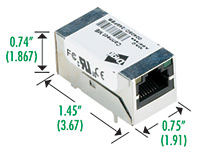
Dimensions: Length: 1.445 in (36.7 mm) Width: 0.75 in (19.05 mm) Height: 0.735 in (18.67 mm)
The Digi ME series offers a:
1) 55Mhz NS7520 NET+ARM 32 bit RISC processor
2) 2 MB Flash and 8 MB RAM on-board memory
3) Five shared General Purpose Input/Output (GPIO) ports
4) High-speed TTL serial interface
5) Throughput up to 230 Kbps
6) Full signal support for TXD, RXD, RTS, CTS, DTR, DSR and DCD
7) Hardware/software flow control
8) 802.3af mid-span power pass-through
Digi Connect Wi-ME
http://www.digi.com/images/dimensions/dimen_digiconnectwime.jpg
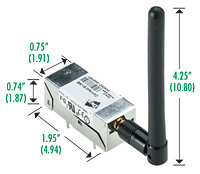
Dimensions: Length: 1.945 in (49.4 mm) Width: 0.75 in (19.05 mm) Height: 0.735 in (18.67 mm)
The Digi Wi-ME series offers a:
1) 55Mhz NS7520 NET+ARM 32 bit RISC processor
2) 4 MB Flash and 8 MB RAM on-board memory
3) Five shared General Purpose Input/Output (GPIO) ports
4) High-speed TTL serial interface
5) Throughput up to 230 Kbps
6) Full signal support for TXD, RXD, RTS, CTS, DTR, DSR and DCD
7) Hardware/software flow control
8) IEEE 802.11b wireless Ethernet
Picotux http://www.picotux.com/
The Picotux 100/112
http://www.picotux.com/pt100a.jpg

http://www.picotux.com/pt112a.jpg

Dimensions: Height: 19 mm Width: 19 mm Deep: 36 mm Weight: 18 g
The Picotux 100 series offers a:
1) 55Mhz 32-bit ARM 7 Netsilicon NS7520 processor
2) 2 MB Flash and 8 MB RAM on-board memory
3) Five shared General Purpose Input/Output (GPIO) ports
4) High-speed TTL serial interface (Throughput up to 230 Kbps)
5) IEEE 802.11 (PoE with adapter cable)
The Picotux 112 is the same as the Picotux 100 but is mounted on a 53mm x 48 mm PCB that has connectors for easier access.
Conclusion
These embedded systems are truly amazing! But they are not the only small computers that are around... cell phones and PDA are unbelievable computer engineering marvels as well. Just use your imagination to come up with uses for small computers with connectivity... the ideas are limitless!
